
How It Works
Every time a player sends a message, Yumina goes through the steps below.
The Cycle
Player input (a message, or a button pressed in the interface)
   ↓
① Engine assembles the prompt: lore + variables + conversation history
   ↓
② AI writes a reply: story text + [state directives]
   ↓
③ Smart tracking: a small helper rereads what just happened and fills in the values that should change, the music that should play, the scene images that should show
   ↓
④ Engine: update variables → check behaviors → run their effects (change values, open lore, play sounds, show notices…)
   ↓
Player sees: story + updated interface + music and pictures
   ↓
Next turn
One Turn, Up Close
A player in a survival-horror game types "I drink the potion." Here's what happens on this turn.
① The prompt the engine assembles
The engine stitches what you wrote, your variables and the conversation history into one prompt and sends it to the AI:
// —— Your lore ——
[system]
You're the narrator of this survival horror game. Cold and restrained
in tone, heavy on sensory detail, and you never decide the player's actions for them.

[system]
The long-abandoned Matsuzaki Sanatorium, sealed off in the winter of 1987.
The player is a college student who came up the mountain to find a missing friend.

// —— Your variables (the engine turns them into a format the AI understands) ——
[system]
<behavior-rules>
[health] the player's health; drops 10-30 when hurt, recovers 5-15 when resting
[sanity] drops 5-15 on horrifying sights, recovers 5-10 when resting
</behavior-rules>

// —— Conversation history ——
[user]
I push the door open

[assistant]
A hand grabs your wrist, the skin unnaturally cold...

[user]
I drink the potion

// —— Current state (updated every turn) ——
[system]
<game-state>
health: 45
sanity: 30
day: 3
</game-state>
② The AI's raw output
The potion burns down your throat, but you feel better.

[health: +20]
③④ What the player finally sees
The potion burns down your throat, but you feel better.
❤️ health 45 → 65
The engine plucks [health: +20] out of the AI's output, applies it to the state, checks whether any behavior should fire (anything planned for full health?), deletes the directive from the text, and shows the player only the clean story.
If you turned on Precise tracking for sanity, the story-writing AI leaves it alone. The smart tracking helper reads the scene and decides instead: drinking a potion isn't scary, so sanity stays put.
What Makes Up a Card
On the canvas, a card is these things, top to bottom:
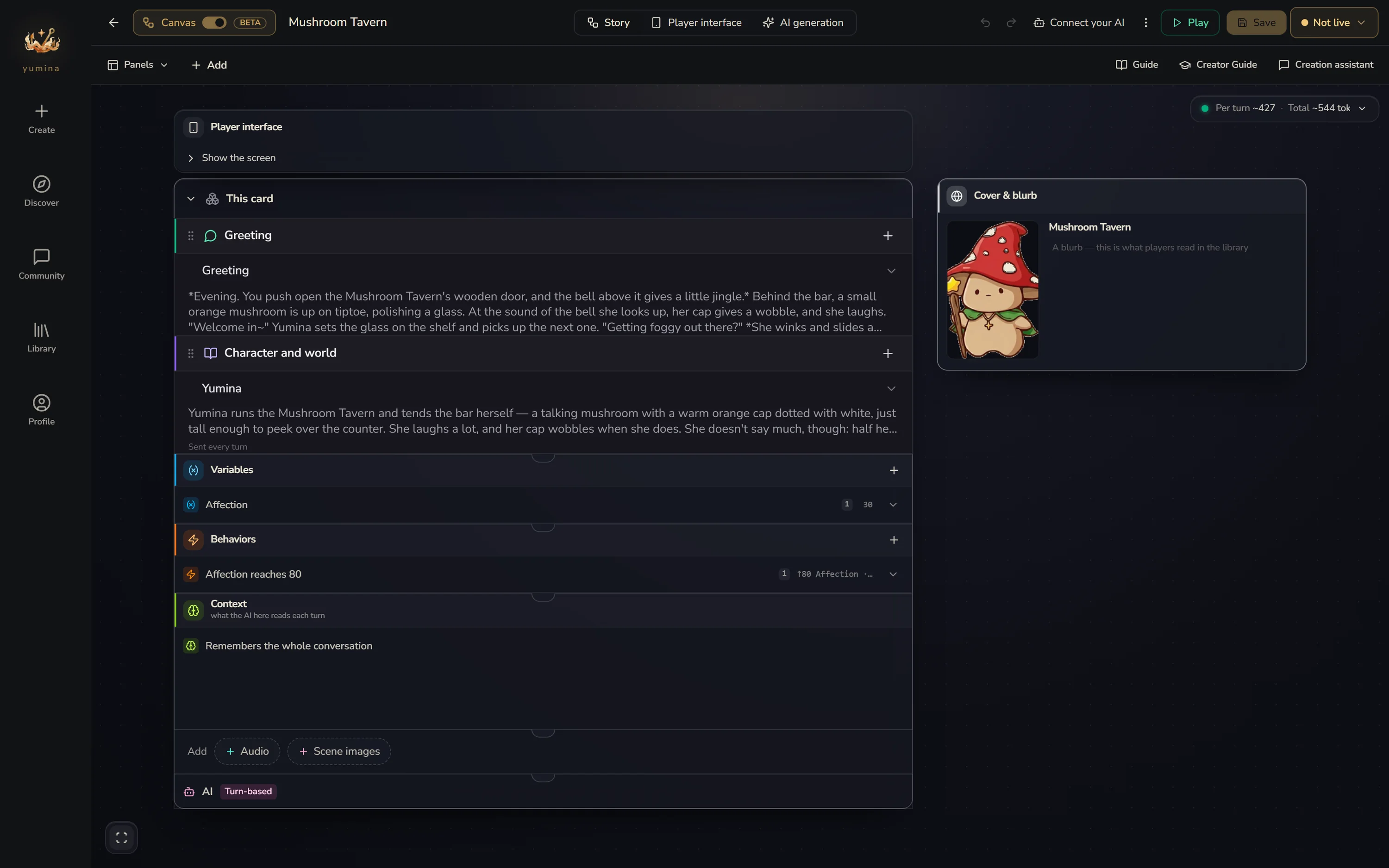
1. Openings and lore: what the AI reads
The opening is the first thing the player reads. Lore is written for the AI: character descriptions, world details and writing style are all lore.
Lore can be Sent every turn (like your world's backstory), or sent when mentioned: give a tavern the keyword "drink", and the tavern lore only goes to the AI when the player or the AI mentions a drink. No mention, no send.
2. Variables: what the story needs to remember
Variables are the game state: health, coins, location, affection, inventory. Every turn the AI reads their current values and updates them with simple directives in its reply:
The bandit's blade catches your arm.
[health: -15]
[location: set "dark forest"]
The player only sees the story. The engine quietly takes the bracketed directives away. All you have to do is say in plain words what the variable is and how it should change, like "drops 10-30 on physical damage, never more than 30 in a single turn", and the engine teaches the AI how to write the directives by itself ( •̀ ω •́ )✧
Every variable takes up a line of the AI's attention every turn, so don't add ones you won't use.
3. Behaviors: things the engine does by itself
Behaviors handle what the AI tends to forget, or what has to be counted exactly. No AI involved:
- When health drops below 10 → show a note: "You're dying!"
- When affection hits 80 → open a piece of romance lore
- Every 5 turns → play a roll of thunder
- The player presses the buy-a-drink button → take 5 coins
4. Scenarios and AIs: other places in the card, and other voices
Once a card grows, you can pack parts of it into scenarios: dungeons, chapters, side stories. They only apply at certain times, and they can have their own memory.
Every card comes with one AI doing the talking. You can add more: let them live in different scenarios, chat together in the same place, or quietly keep the books behind the scenes.
5. Player interface, pictures and sound: what the player sees and hears
By default players get a clean chat interface, and for most cards that's plenty.
If you want to go further, the Player interface lets you start from a template and build opening pages, status panels, an inventory, a map, phone messages… no code needed. Add scene images, background music and sound effects, and the AI plays them when the story gets there.
→ Player interface · Visuals & audio
The Order the AI Sees Things
Here's roughly the order in which things are sent to the AI each turn. The AI pays the most attention to the beginning and the end. The middle is easier to overlook:
| Order | What | On the canvas |
|---|---|---|
| 1 | Lore sent every turn (characters, world, narration instructions) | Character and world |
| 2 | The player's persona (name, looks, backstory) | Set by the player, not you |
| 3 | Platform instructions, including your variables' Behavior Rules | Generated automatically |
| 4 | Example dialogue | Lore with Inject into set to "Example dialogue" |
| 5 | Lore mentioned this turn, or whose conditions hold | Keyword lore, Conditional lore |
| 6 | Memory summaries, and what other scenarios handed over | A scenario's memory settings |
| 7 | Recent conversation | Handled automatically |
| 8 | Lines added by behaviors, values and last turn's changes | Behaviors, variables |
| 9 | Final reminders (output format, style rules) | Lore with Inject into set to "At the end" |
In a playtest, What the AI got shows what the AI actually got on a given turn, split into these parts, with the size of each one.
Let AI Help You Build
The Creation assistant (recommended)
The Creation assistant in the top right of the canvas is an AI built into the editor. Tell it what you want and it writes lore, adds variables, sets up behaviors, and can even build the player interface:
"Make a survival horror world with health, sanity and hunger. The player is trapped in an abandoned hospital. Sanity drops when they see horrifying things. When sanity hits zero, the AI should describe hallucinations."
It builds the lore, the variables with their Behavior Rules, and the behavior that fires at zero sanity. Once it's built, go over it yourself. That turns out better than using it as is.
Your own AI
If you'd rather use Claude, ChatGPT, Cursor or Claude Code, Connect your AI in the ⋮ menu at the top right lets it sign in to your Yumina directly, read your card and edit it. Its changes show up live on the canvas you have open.
→ The Creation assistant and your own AI
Get started
Open the editor, make a new card, pick Canvas, then follow Getting started on the canvas.